


Themebox - App icons, Widgets
4.7655.00 Reviews
App Specs
- Version
- 1.3.1
- Updated On
- License
- Free
- Downloads
- 10,000,000+
- Developer
- Fusion Flow Tech
- Categories
- Personalization
- Platform
- Android, iOS
Screenshots


 Analysis by AppCompare
I judge a personalization app by whether it helps me create a look I’ll actually enjoy living with, not just one that looks impressive in a preview. That means asking a few practical questions: can I make icons and widgets feel coordinated, is the setup manageable, and will I still like the result when I’m checking my phone in a hurry? Themebox - App icons, Widgets is aimed at people who want to change the feel of their home screen without turning customization into a technical project.
Themebox is a free personalization app from Fusion Flow Tech, and its current version is 1.2.1. It has a 4.8 average from around 114 thousand ratings, with more than a million installs. Those figures suggest broad interest, but they don’t tell me whether its style will suit your taste. I’d treat it as a convenient place to explore a new visual direction, rather than assume every design will be a perfect fit.
Choose a look you can use every day
The most useful way to approach a home-screen makeover is to start with how you use your phone. If your first screen is mostly practical—messages, a calendar, maps, and a few work apps—choose an icon style that makes those familiar apps easy to spot. A dramatic theme can look striking, but if every icon becomes visually similar, finding the one you need may take longer. I’d make the main screen readable first, then use a more expressive look on a second screen.
Widgets deserve the same practical test. A clock or calendar can earn its space by making a quick check easier; a decorative widget is worthwhile if it makes you happier to pick up your phone. Before committing to a layout, consider which information you genuinely look at during the day. That small decision helps keep a design from becoming cluttered simply because there are several styles to try.
What makes Themebox appealing
In my experience, the appeal is the freedom to combine icon and widget styles instead of treating the whole screen as one fixed package. That makes it easier to aim for a personal look: a restrained set of icons can sit beside a more playful clock, for example. The app is especially suited to someone who enjoys experimenting but doesn’t want to begin by learning advanced device settings.
It can also be a good fit if you’re refreshing a phone you already know well. A new visual arrangement gives the home screen a change of mood without asking you to relearn what your apps do. I’d save time by choosing a small group of frequently used apps first, then building the look around them; that’s more useful than spending ages styling icons you rarely open.
Unleashing Your Creativity
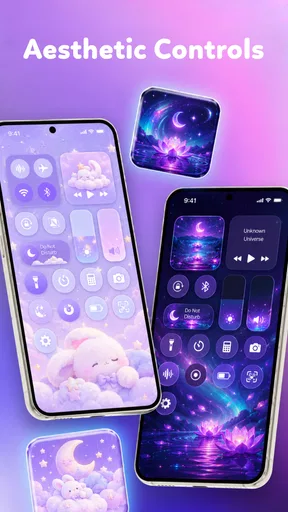
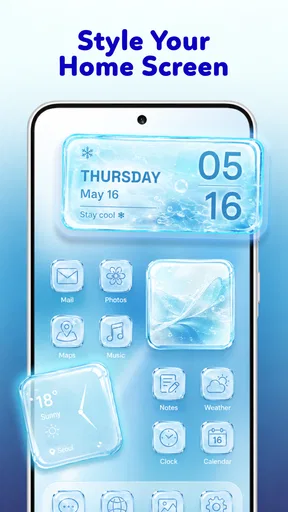
First things first, Themebox is all about customization. It lets you switch up your app icons and widgets with ease. I was blown away by the variety of icons available. We're talking everything from sleek minimalist designs to vibrant, artsy ones. Honestly, it's like giving your phone a fresh new wardrobe.
Worth Reading Before You Choose

EA SPORTS FC Mobile 26 Is a Bigger Football Game, but It Takes Time

Flipboard Shows What News Apps Must Do Beyond the Feed

Switching to Android Auto Means Rethinking Your Driving Routine

Google Calendar Makes a Crowded Week Easier to Manage

Ludo King Makes the Most of the Minutes Between Plans

Baby Panda World Brings Quick Play to Modern Phones, but Its Game Library Feels Busy
Setting it up is a breeze. I was worried it might be a hassle, but nope! The app walks you through the process step-by-step, making it super user-friendly. Within minutes, I had a whole new look going on.
A Widget Wonderland
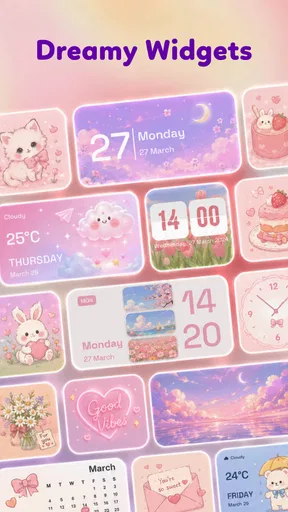
Widgets are where this app truly shines. I mean, who doesn't love a good widget, right? Whether you want a weather update or a calendar at a glance, Themebox has you covered. The variety is impressive, and you can tweak the sizes and styles to fit your mood or theme. I found myself changing them up just for fun.
Oh, and the best part? You can mix and match. Feel like having a retro clock paired with a modern icon set? Go for it! It's all about making your phone feel like it's truly yours.
Performance and Usability
Now, I know what you're thinking. Does all this customization slow down my phone? Not at all! I was pleasantly surprised by how smoothly everything ran. No glitches or lag, just seamless transitions and a visually appealing interface.
The app itself is pretty lightweight. It doesn't hog your storage space or drain your battery, which is a big win in my book. Plus, the developers keep rolling out updates, so you know the app is always getting better.
Check the trade-offs before switching
There’s a difference between choosing a theme inside a customization app and changing every part of how your phone behaves. Themebox is for visual adjustments, not a replacement for the operating system’s navigation or a full-featured home-screen launcher. If you want extensive control over gestures, folders, or screen behavior, a launcher may suit you better. If your goal is mainly a fresh look for icons and widgets, this app is the more direct place to start.
I’d also keep expectations grounded around compatibility and setup. Android home screens can handle icon and widget changes differently, so the exact steps and final appearance may depend on your device and its software. The app’s guided process helps, but I’d apply one small change first and check how it appears before rebuilding the entire screen. That gives you an easy way to spot any mismatch without having to undo a large makeover.
A practical makeover, without losing your routine
Imagine getting ready for work and wanting to see your next appointment without opening another app. A calendar widget near the top of the home screen can make that glance quicker, while a consistent icon style keeps the apps you use each morning easy to recognize. Themebox is most helpful in this sort of everyday situation: the visual change is enjoyable, but the layout still serves a purpose.
One useful trade-off is to reserve your most-used screen for clarity and experiment elsewhere. You can try a more colorful set on a secondary page while keeping calls, messages, and navigation familiar on the first. This gives you room to explore without turning a quick task into a search. It’s also a sensible way to decide whether a theme works in real use rather than judging it only by its appearance.
If you’re deciding between Themebox and your phone’s built-in wallpaper and display options, the choice comes down to scope. Built-in settings are often enough when all you want is a wallpaper or a basic color adjustment. Themebox makes more sense when you specifically want to coordinate icons and widgets. For people who want deep layout control, a dedicated launcher is the more flexible category; for people who want a visual refresh with less tinkering, Themebox is the easier route to try.
Cost, access, and who should pass
The app is free to download, with optional in-app purchases listed from $3.99 to $19.99 per item. I’d explore the free experience before paying for anything, and only spend if a particular style or option is something you know you’ll keep using. That’s a better approach than buying into a broad makeover before you’ve checked whether the designs fit your daily screen.
It’s marked for Everyone and supports Android 7.0 or later. If you’re using an older Android version, it won’t be a suitable choice; if you’re on a supported device, the next question is whether visual customization is worth adding to your routine. People who rarely change their home screen, prefer the stock look, or need advanced launcher controls may be happier with their existing setup or another kind of personalization tool.
A common concern is whether trying a theme means giving up a familiar layout. I’d treat the change as something to test in stages: begin with a widget or a handful of icons, see whether the screen remains comfortable to navigate, and expand only if it does. Another practical question is whether you need to pay to get started. You can install it for free, while purchases are optional; check the in-app choices before deciding if any paid option is worthwhile for you.
Final Thoughts
If you're looking to give your phone a personal touch without diving into complicated settings or risking a meltdown, Themebox is definitely worth a try. It's fun, intuitive, and adds a splash of personality to your device. So, go ahead, give it a whirl and let your creativity run wild. Your phone deserves it!
My recommendation is to try it when you want icons and widgets to feel more like your own, and to make changes gradually so convenience stays ahead of decoration. I wouldn’t choose it as a substitute for a full launcher or if you’re already satisfied with your phone’s appearance. But if a coordinated visual refresh sounds appealing, Themebox - App icons, Widgets offers an approachable starting point; the best result is the one that looks good and still makes your everyday screen easy to use.
Pros
- Wide variety of icon themes available.
- Easy to customize home screen aesthetics.
- Regular updates with new content.
- User-friendly interface for quick setup.
- Compatible with most Android and iOS devices.
Cons
- Some themes require in-app purchases.
- Occasional lag when switching themes.
- Limited free options available.
- Ads can be intrusive at times.
- Requires internet connection for updates.
FAQs for Themebox - App icons, Widgets
What is Themebox and how does it enhance my device?
Themebox is a customization app designed for both Android and iOS devices, providing a range of app icons, widgets, and themes to personalize your device's appearance. It allows users to create a unique aesthetic for their home screen, enhancing the user interface with a creative touch.
Is Themebox compatible with all devices and operating systems?
Themebox is compatible with most modern Android and iOS devices. It supports the latest operating systems, ensuring you have access to all features. However, it's important to check the app's requirements on the download page to confirm compatibility with your specific device.
Are the themes and icons in Themebox customizable?
Yes, Themebox offers a high degree of customization. Users can mix and match various themes, icons, and widgets to create a personalized look. The app frequently updates its library, providing new designs and customization options to keep your device looking fresh and unique.
Does Themebox require any special permissions to function?
Themebox requires certain permissions to operate effectively, such as access to your device's storage to apply themes and icons. It may also request permission to manage widgets. These permissions are necessary for the app to deliver a seamless customization experience.
Is there any cost associated with using Themebox?
Themebox offers a free version with limited features, but it also provides a premium subscription that unlocks the full range of themes, icons, and widgets. The premium version is ad-free and includes exclusive content, making it a worthwhile investment for those looking to fully personalize their device.


